·
믹스드 미디어 콜라주 (Mixed Media Collage)
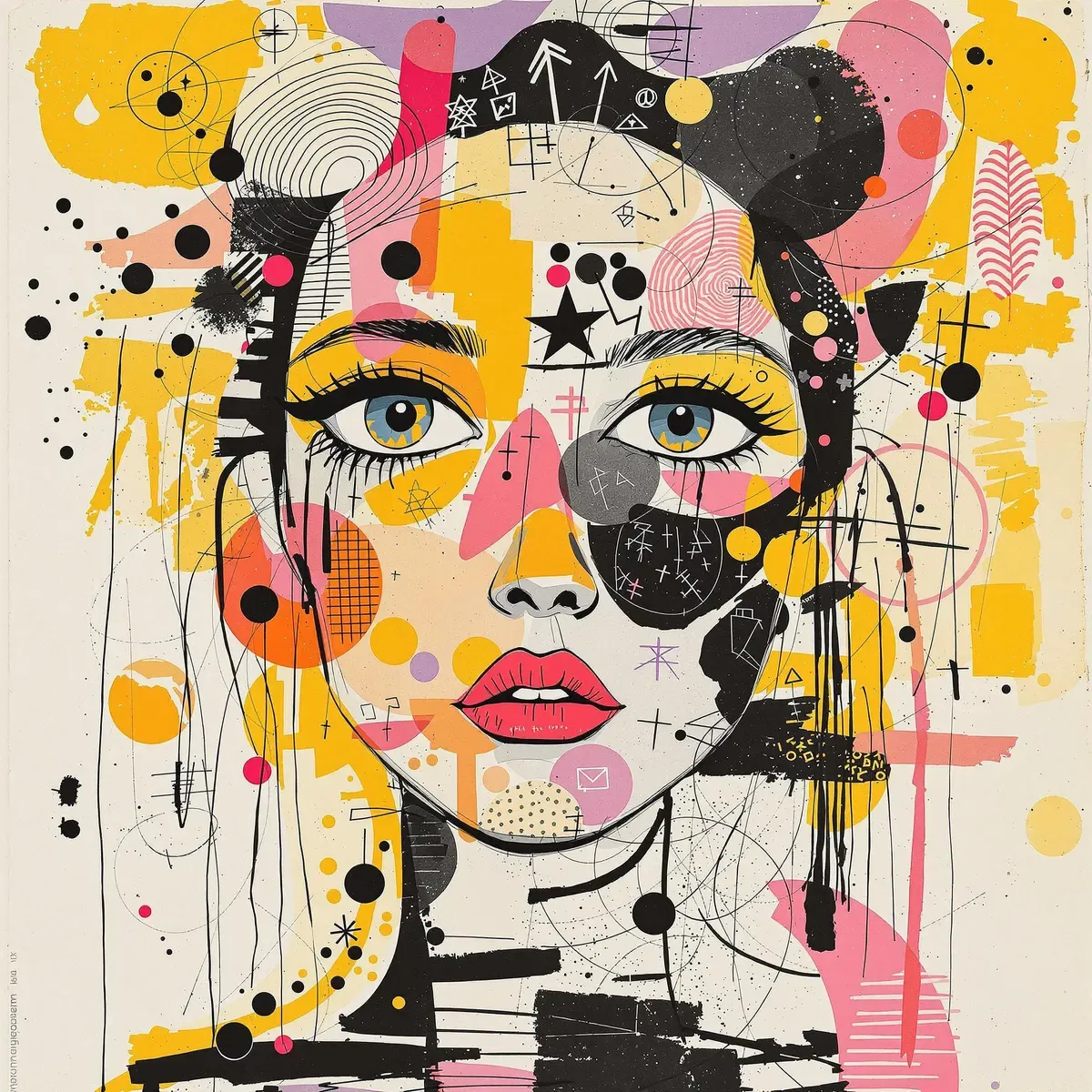
미드저니 전용 --ar·--stylize·--v 플래그가 그대로 섞여 있지만 정작 정사각형으로 나온 FLUX 1.1 Pro Ultra의 팝아트 콜라주 초상
예시 이미지
프롬프트
A mixed media collage featuring an abstract female figure with expressive eyes, adorned in vibrant patterns and symbols that evoke emotion., focus on face, isolated background, color splashes, scribbles, pen strokes, collage style, mixed media collage, scrapbook aesthetic, yellow-orange black purple pink white tones, vintage paper textures, hand drawn elements, playful use of shapes, bold shadows, whimsical atmosphere, textured brushstrokes, monochromatic palette, light pastel colors --ar 1:2 --stylize 750 --v 6.1파라미터
| 파라미터 | 값 |
|---|---|
| seed | 830097 |
| dimensions | 2048x2048 |
재현 절차
- FLUX 1.1 Pro Ultra 환경에 프롬프트 원문을 그대로 입력한다: A mixed media collage featuring an abstract female figure with expressive eyes, adorned in vibrant patterns and symbols that evoke emotion., focus on face, isolated background, color splashes, scribbles, pen strokes, collage style, mixed media collage, scrapbook aesthetic, yellow-orange black purple pink white tones, vintage paper textures, hand drawn elements, playful use of shapes, bold shadows, whimsical atmosphere, textured brushstrokes, monochromatic palette, light pastel colors --ar 1:2 --stylize 750 --v 6.1
- seed 830097로 맞추면 유사한 색 배치를 재현할 수 있다 — 다만 호스팅 환경에 따라 완전히 동일하지는 않다.
- 프롬프트 끝의 --ar 1:2 --stylize 750 --v 6.1은 미드저니 전용 파라미터라 FLUX에서는 인식되지 않는다. 실제 출력도 1:2가 아닌 2048×2048 정사각형이므로, 세로 구도가 필요하면 이 문구 대신 플랫폼 자체의 종횡비 옵션을 따로 지정한다.
- 다른 인물로 확장하려면 'an abstract female figure with expressive eyes' 부분만 바꾸고 색·질감·기법을 지정하는 나머지 문장은 그대로 유지한다.
후보정
색면과 얼굴 라인아트가 사실상 분리된 레이어처럼 겹쳐 있어, 후보정에서 얼굴 윤곽선만 골라 살짝 언샵 처리하거나 배경 색면만 채도를 낮춰 얼굴을 더 도드라지게 만드는 식의 분리 편집이 비교적 수월하다.
PromptHero에서 원문 그대로 확인한 프롬프트는 A mixed media collage featuring an abstract female figure with expressive eyes, adorned in vibrant patterns and symbols that evoke emotion., focus on face, isolated background, color splashes, scribbles, pen strokes, collage style, mixed media collage, scrapbook aesthetic, yellow-orange black purple pink white tones, vintage paper textures, hand drawn elements, playful use of shapes, bold shadows, whimsical atmosphere, textured brushstrokes, monochromatic palette, light pastel colors --ar 1:2 --stylize 750 --v 6.1이다(“evoke emotion.” 뒤에 붙은 쉼표까지 원문 그대로다). 모델은 FLUX 1.1 Pro Ultra, seed 830097·dimensions 2048×2048로 표기돼 있는데, 문장 끝의 --ar 1:2 --stylize 750 --v 6.1은 미드저니 전용 구문이다. 실제 출력이 세로 1:2가 아니라 정사각형 2048×2048로 나온 것을 보면 이 플래그들이 FLUX에서는 인식되지 않고 그대로 죽은 텍스트로만 남았다는 것을 확인할 수 있다.
토큰을 앞에서부터 보면 A mixed media collage featuring an abstract female figure with expressive eyes가 장르(콜라주)와 소재(표정이 강조된 추상적 여성 얼굴)를 지정하고, adorned in vibrant patterns and symbols that evoke emotion.이 얼굴 위에 얹힐 상징·패턴 장식을 요구한다. focus on face, isolated background가 구도를 얼굴 클로즈업과 단색 배경으로 좁히고, color splashes, scribbles, pen strokes, collage style, mixed media collage, scrapbook aesthetic는 기법을 여섯 개에 가까운 유사어로 겹쳐 강조한다. yellow-orange black purple pink white tones가 실제 팔레트를 지정하고, vintage paper textures, hand drawn elements, playful use of shapes, bold shadows, whimsical atmosphere, textured brushstrokes가 질감과 무드를 채운다. 마지막의 monochromatic palette, light pastel colors는 앞서 지정한 원색 팔레트와 상반되는 지시인데, 실제 이미지는 노랑·핑크·보라 원색 쪽으로 강하게 쏠려 있어 이 마지막 두 구절은 사실상 결과에 반영되지 않은 것으로 보인다.
인물을 다른 소재로 바꾸려면 an abstract female figure with expressive eyes 부분만 다른 인물 묘사로 교체하고 색·질감·기법을 지정하는 나머지 문장은 그대로 두는 편이 스타일을 지키기 좋다. 프롬프트 끝의 --ar 1:2 --stylize 750 --v 6.1은 FLUX 계열에서는 실질적으로 무시되므로, 세로로 긴 구도가 필요하면 이 문구 대신 플랫폼 자체의 종횡비 옵션으로 직접 지정해야 한다.
seed 830097을 고정해도 FLUX 1.1 Pro Ultra는 호스팅 환경에 따라 완전히 동일한 결과가 보장되지 않는다. 실패는 주로 두 방향에서 나온다 — 원색 지시와 모노크롬·파스텔 지시가 한 프롬프트에 공존하다 보니 생성마다 채도가 크게 요동칠 수 있고, 별·화살표·격자무늬 같은 상징 요소가 과하게 겹치면 focus on face가 무색해질 만큼 얼굴 윤곽 자체가 기호에 파묻히는 경우도 흔하다.
출처
- PromptHero — A mixed media collage featuring an abstract female figure with expressive eyes, adorned in vibrant patterns and symbols… · 수집일 2026-08-30 · 원문 전체 확인
- 이미지: 출처 페이지의 실제 생성 결과물