·
복셀 아트 묘지 디오라마 (Voxel Graveyard Diorama)
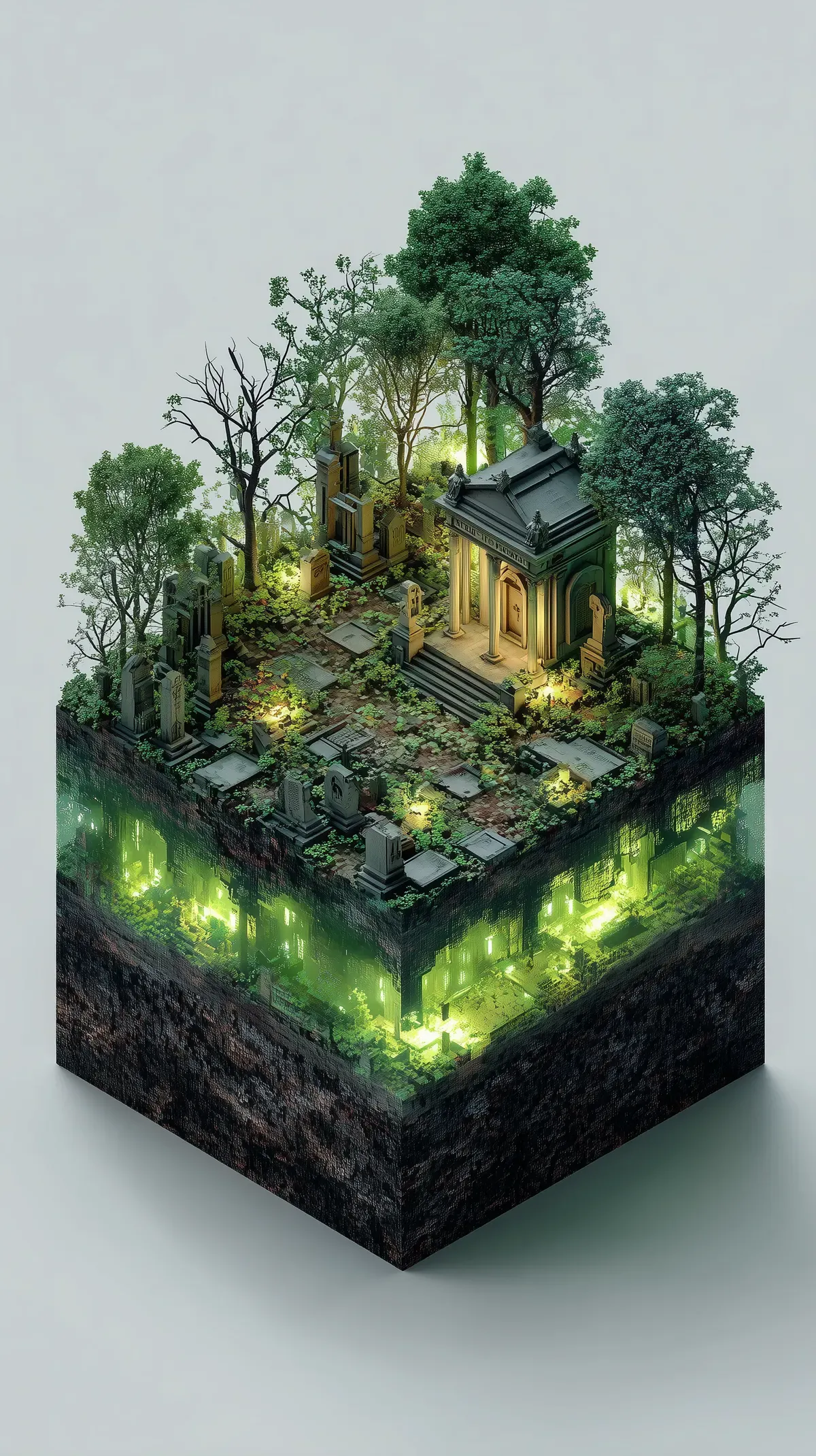
지상의 스산한 묘지와 지하의 발광 유적을 한 큐브 안에 함께 담은 미드저니 Shatter의 복셀 아트 디오라마
예시 이미지
프롬프트
isometric voxel art diorama, abandoned spooky graveyard, 3d pixel block rendering technique, rigid geometric structural perfection, eerie glowing ghostly green illumination casting soft dynamic shadows, cracked dirt ground base foundation, strict orthographic overhead perspective, clean blank isolated background, miniature micro world aesthetic, vibrant saturated color grading, retro indie game environment concept, incredibly complex spatial arrangement, high resolution digital asset --ar 9:16 --raw --stylize 300파라미터
| 파라미터 | 값 |
|---|---|
| ar | 9:16 |
| raw | true |
| stylize | 300 |
재현 절차
- 미드저니 Shatter(--raw·--stylize를 지원하는 V6/V7 계열) 환경에 프롬프트 원문을 그대로 입력한다: isometric voxel art diorama, abandoned spooky graveyard, 3d pixel block rendering technique, rigid geometric structural perfection, eerie glowing ghostly green illumination casting soft dynamic shadows, cracked dirt ground base foundation, strict orthographic overhead perspective, clean blank isolated background, miniature micro world aesthetic, vibrant saturated color grading, retro indie game environment concept, incredibly complex spatial arrangement, high resolution digital asset --ar 9:16 --raw --stylize 300
- --ar 9:16으로 세로 비율을, --raw로 과한 기본 미학 보정을 줄이고, --stylize 300으로 중간 강도 스타일화를 맞춘다 — 출처 페이지에 시드가 공개돼 있지 않아 큐브 조각의 정확한 배치까지 동일하게 재현되지는 않는다.
- 복셀 특유의 각진 블록감이 약하게 나오면 문장 앞쪽에 'chunky voxel blocks, low resolution' 같은 보조 문구를 추가해 재생성한다.
- 다른 소재로 확장하려면 'abandoned spooky graveyard'만 바꾸고 '3d pixel block rendering technique'부터 'strict orthographic overhead perspective'까지 이어지는 스타일 락 문장은 그대로 유지한다.
3D 확장
이 큐브는 정투영 한 시점을 기준으로 윗면과 좌우 두 옆면만 실제로 디테일이 그려져 있고 반대편은 알 수 없으므로, 매지카복셀(MagicaVoxel) 같은 실제 복셀 에디터로 옮기려면 보이지 않는 면은 대칭이라 가정하고 채우거나 반대편 시점을 별도로 재생성해 참고해야 한다. 지하 단면의 발광부도 실제 볼류메트릭 조명이 아니라 텍스처에 가깝게 그려져 있어, 3D 씬으로 옮길 때는 발광 텍스처를 별도 이미시브 머티리얼로 다시 만들어 얹는 편이 정확하다.
후보정
지상부의 따뜻한 조명과 지하부의 형광 초록빛 사이에 이미 색온도 대비가 뚜렷하므로 추가 색보정보다는 지하 발광부 경계에 블룸(bloom)을 살짝 얹어 볼류메트릭 발광처럼 보이게 하는 정도로 충분하고, 큐브 옆면의 흙 단면은 대비를 살짝 높여 지상부와의 경계를 더 또렷하게 분리해주면 디오라마 느낌이 강해진다.
PromptHero에서 원문 그대로 확인한 프롬프트는 isometric voxel art diorama, abandoned spooky graveyard, 3d pixel block rendering technique, rigid geometric structural perfection, eerie glowing ghostly green illumination casting soft dynamic shadows, cracked dirt ground base foundation, strict orthographic overhead perspective, clean blank isolated background, miniature micro world aesthetic, vibrant saturated color grading, retro indie game environment concept, incredibly complex spatial arrangement, high resolution digital asset --ar 9:16 --raw --stylize 300이다. 출처 페이지에는 모델이 “Midjourney Shatter”로 표기돼 있고 PromptHero 자체 분류에서도 3d-renders 카테고리에 걸려 있는데, “Shatter”가 정확히 어떤 공식 명칭인지는 페이지만으로 확인되지 않는다 — 다만 –raw·–stylize처럼 실제 미드저니 V6/V7 계열 파라미터가 함께 쓰인 것으로 볼 때 미드저니 기반 생성이라는 점은 분명하다. 실제 이미지는 허공에 뜬 정육면체 블록 하나에 지상의 스산한 묘지와 지하에 파묻힌 초록빛 발광 유적을 함께 담고 있다.
문장 앞부분 isometric voxel art diorama가 시점(아이소메트릭)·기법(복셀)·형식(디오라마)을 한꺼번에 지정하고, abandoned spooky graveyard가 소재를 못박는다. 3d pixel block rendering technique, rigid geometric structural perfection은 복셀 특유의 각진 블록 형태를 재차 강조하는 스타일 락 문장이고, eerie glowing ghostly green illumination casting soft dynamic shadows가 무덤 사이사이와 지하 단면에서 새어 나오는 형광 초록빛 조명을 지정한다. cracked dirt ground base foundation은 큐브 옆면의 갈라진 흙 단면을, strict orthographic overhead perspective는 소실점 없는 정투영 카메라를, clean blank isolated background는 무지 배경 처리를 각각 요구한다. 뒤에 이어지는 miniature micro world aesthetic, vibrant saturated color grading, retro indie game environment concept, incredibly complex spatial arrangement, high resolution digital asset는 스케일감과 톤·완성도를 다지는 상투어 다발이다. --raw는 미드저니 기본 미학 보정을 줄여 프롬프트 문구에 더 직접적으로 반응하게 만드는 옵션이고, --stylize 300은 기본값(100)보다 높은 중간 강도의 스타일화다.
같은 구조를 다른 소재에 적용하려면 abandoned spooky graveyard 자리만 폐공장, 침몰선, 던전 같은 소재로 바꾸고 나머지 스타일 락 문장은 그대로 두는 편이 안전하다. 발광 색을 초록 대신 보라나 시안으로 바꾸면 같은 큐브 디오라마 구도를 유지하면서도 마법 유적이나 사이버펑크 폐허 같은 전혀 다른 무드로 확장할 수 있다.
–ar 9:16 –raw –stylize 300을 그대로 맞추면 세로 구도와 스타일화 강도는 재현되지만, 미드저니 특성상 동일 시드가 공개돼 있지 않아 큐브 조각의 정확한 배치까지 똑같이 나오지는 않는다. 무덤·나무·건물·지하 발광부까지 요소가 한 문장에 몰려 있어 생성마다 지상 건축물의 형태나 지하 발광부의 면적이 크게 달라지는 편이고, 지시가 많을수록 큐브 옆면의 흙 단면 질감이 밋밋한 회색 덩어리로 뭉개지는 실패도 흔하다. 3d pixel block rendering technique을 명시했음에도 실제로는 매끈한 디테일 렌더링에 가깝게 나오는 경우가 있어, 또렷한 픽셀 각짐을 원한다면 chunky voxel, low resolution blocks 같은 보조 문구를 앞쪽에 추가하는 편이 낫다.
출처
- PromptHero — isometric voxel art diorama, abandoned spooky graveyard, 3d pixel block rendering technique… · 수집일 2026-08-30 · 원문 전체 확인
- 이미지: 출처 페이지의 실제 생성 결과물