·
네온 튜브 3D 타이포 (Neon Tube 3D Typography)
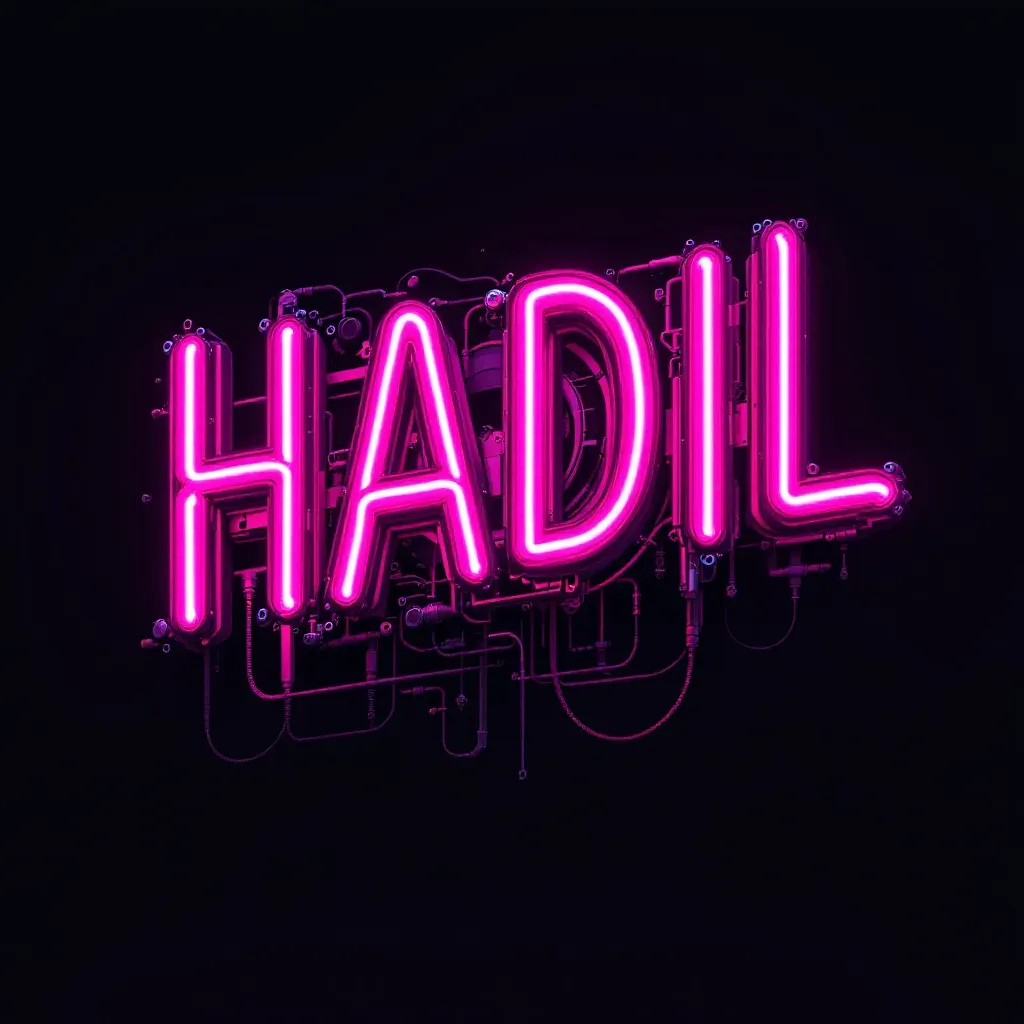
프롬프트 끝의 '--ar 9:16'이 무시되고 정사각형 1024×1024로 나온 FLUX 1.1 Pro의 네온관 HADIL 3D 타이포
예시 이미지
프롬프트
text 'HADIL' sculpted from intertwined neon tubes in a bright magenta color, front view, set against a dark background with tech-inspired metal details and intricate mechanical components, featuring small dials and riveted metal bands, high resolution 3D rendered and isolated, capturing a futuristic and industrial aesthetic, RTX shader, UHD, many detail --ar 9:16파라미터
| 파라미터 | 값 |
|---|---|
| seed | 352505 |
| dimensions | 1024x1024 |
재현 절차
- FLUX 1.1 Pro(Replicate API) 환경에 프롬프트 원문을 그대로 입력한다: text 'HADIL' sculpted from intertwined neon tubes in a bright magenta color, front view, set against a dark background with tech-inspired metal details and intricate mechanical components, featuring small dials and riveted metal bands, high resolution 3D rendered and isolated, capturing a futuristic and industrial aesthetic, RTX shader, UHD, many detail --ar 9:16
- seed 352505를 맞추면 같은 글자 배치가 재현된다 — 다만 프롬프트 끝의 '--ar 9:16'은 미드저니 문법이 그대로 섞여 들어간 죽은 텍스트라 실제로는 무시되고, 출처 이미지도 dimensions 1024×1024(1:1)로 나왔다
- 세로 비율이 실제로 필요하면 '--ar 9:16' 문구를 지우고 FLUX API의 aspect_ratio 파라미터를 9:16으로 별도 지정해야 한다
- 다른 글자로 확장하려면 'HADIL' 자리만 바꾸되 5~6자 내외 길이를 유지해야 튜브 볼륨감과 배경 디테일 노출의 균형이 맞는다
3D 확장
정면 한 장뿐이라 글자 튜브의 옆면·뒷면 단면은 추정해야 하고, 네온 특유의 발광은 실제 3D 렌더에서 이미시브(emissive) 머티리얼에 강한 블룸을 얹어야 비슷한 느낌이 난다. 배경의 기계 부품은 글자와 별개 레이어로 분리하기 좋게 어둡게 깔려 있어, 글자 튜브 메시만 따로 뽑아 다른 배경에 재합성하기도 수월하다.
후보정
배경이 어두운 단색이라 발광 부분만 스크린 블렌드로 따로 추출해 블룸을 더 키울 수 있고, 마젠타 외 다른 색조(시안·앰버)로 톤을 바꾸고 싶다면 색상 자체를 색조 회전(hue shift)만으로도 간단히 바꿀 수 있다.
PromptHero에서 원문 그대로 확인한 프롬프트는 text 'HADIL' sculpted from intertwined neon tubes in a bright magenta color, front view, set against a dark background with tech-inspired metal details and intricate mechanical components, featuring small dials and riveted metal bands, high resolution 3D rendered and isolated, capturing a futuristic and industrial aesthetic, RTX shader, UHD, many detail --ar 9:16이다. 결과 이미지는 마젠타빛 네온관을 서로 꼬아 만든 대문자 ‘HADIL’ 글자가 검은 배경 위에 떠 있고, 글자 뒤로는 다이얼과 리벳이 박힌 금속 배관·기계 부품이 얼기설기 얽혀 있는 정사각형(1024×1024) 이미지다. 모델은 FLUX 1.1 Pro, seed는 352505다.
text 'HADIL' sculpted from intertwined neon tubes in a bright magenta color가 글자 내용·재질·색상을 한 번에 정하고, front view가 카메라 앵글을 정면으로 고정한다. set against a dark background with tech-inspired metal details and intricate mechanical components, featuring small dials and riveted metal bands는 배경을 그냥 어둡게 두지 않고 다이얼·리벳 밴드가 달린 산업용 기계 장치로 채우라는 구체적 지시다. high resolution 3D rendered and isolated가 입체감과 배경 분리를 요구하고, capturing a futuristic and industrial aesthetic, RTX shader, UHD, many detail이 톤과 렌더 품질을 재차 강조한다.
눈여겨볼 지점은 프롬프트 맨 끝의 --ar 9:16이다. 이건 미드저니 문법에서 빌려온 세로 9:16 비율 플래그인데, FLUX 1.1 Pro는 프롬프트 텍스트 안에 적힌 -- 플래그를 파싱하지 않고 별도의 aspect_ratio 파라미터로 비율을 받는 모델이다. 실제로 출처 페이지의 생성 파라미터 칩에는 --ar 9:16 대신 dimensions 1024×1024(정사각형, 1:1)만 표시돼 있어, 텍스트 안의 --ar 9:16은 그대로 무시된 채 아무 효과도 내지 못한 죽은 텍스트로 남았다. 세로 비율이 필요하다면 프롬프트 끝의 플래그를 지우고 FLUX API의 별도 aspect_ratio 파라미터를 9:16으로 지정해야 한다.
seed 352505를 그대로 맞추면 동일한 글자 배치가 재현되지만, 글자 내용(HADIL)만 다른 단어로 바꾸면 같은 seed라도 글자 길이에 따라 구도 전체가 다시 짜여 배경의 기계 디테일 위치까지 달라진다. 짧은 단어(34자)는 글자가 커지면서 배경 디테일이 가려지는 경우가 많고, 긴 단어는 튜브가 가늘어지며 네온 특유의 두툼한 볼륨감이 옅어지는 경향이 있어, 56자 내외의 단어에서 가장 균형 잡힌 결과가 나온다.
출처
- PromptHero — text ‘HADIL’ sculpted from intertwined neon tubes in a bright magenta color, front view, set against a dark… · 수집일 2026-08-31 · 원문 전체 확인
- 이미지: 출처 페이지의 실제 생성 결과물(1024×1024)